Posts

Syria through the eyes of its own people

Saw this list of pictures of Syria on the BBC website. Here they are .

HA.... gotta love it.

One of my all time favourite places for a mental break during the work day is FailBlog.org . It is funny and good for a 2 minute break. Being Canadian, I couldn't help but post this .

ThinkPad T400 Xorg tweak on Ubuntu Intrepid 8.10

Image
Getting Ubuntu 8.10 working on my ThinkPad T400 (with Intel 4500HD) is a dream. One area that I found to be quite annoying is the extra "Unknown" screen that shows up when I launch the "Gnome Monitor Resolution Settings" utility. Usually I get my laptop screen and another "Unknown" screen. This is fine with one exception. I have an advanced mini docking station with a DVI powering my LG 24" LCD. Usually, I like to use the Gnome Monitor Resolution Settings utility to turn off the laptop screen and keep the LG 24" on instead. The problem is when I want to take my laptop out of the docking station, I need to turn off the LG screen and turn on the laptop screen. When I do that, X crashes and I lose all my open windows. This sucks because I have lots of those windows open with files and such and it is a a pain to do that. After some researching, I figured out that if I tell Xorg to turn off this "Unknown" screen, turning things on and...

Scan with Brother MFC7820 with Ubuntu Intrepid

I have lots of receipts and docs that I wish to scan and my Brother MFC 7820 didn't work due to permissions problems. Here is how I got it working. Install the libsane-extras package since it isn't installed by default Download and install the Brother scanner driver. Brother providers .deb packages, although they are not great. Get it here Edit "/etc/udev/rules.d/50-libsane-extras.rules" and add the following file to it:(2 lines) #Brother|MFC-640CW SYSFS{idVendor}=="04f9", SYSFS{idProduct}=="0181", MODE="664", GROUP="scanner" logout and log back in and you should be good to go If you don't have the same exact model, you can replace the idVendor and idProduct by using the command " sane-find-scanner " and it will list your scanner with all the ids in there. Copy the numbers but ignore the "0x".

Gnome Panel Applets Affinity

Image
It has been a while since I posted anything. I got a new job that took all my time. Now that I am up to speed, I plan on adding more ideas as I have switched to Ubuntu 100%. I have a laptop I usually hook up to a large screen. Upon hooking up to the large screen, the GNOME Applets jump around the GNOME Panel (shown below). It would be nice if the panels simply butted against each other in the same order I put them in. Imagine that the GNOME Panel is just a surface and the Applets are small magnets that slide across it. If the sound applet is close to the Notification applet, it will simply butt against it just like a magnet. If it was close to the window list applet, it would butt against it instead.

Popup menu auto-locator

Image
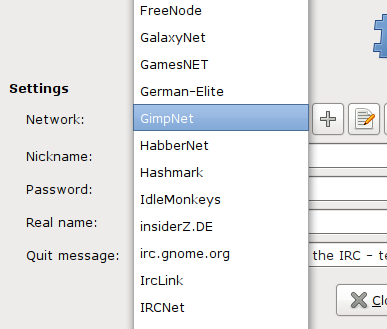
Here is another one I noticed today.  If you happen to click on a pop up menu that goes beyond the usual 3 - 5 items, you will surely not like having to scan through the entire list until you find what you are looking for.  Here is one I had to deal with today: This is from empathy I was looking for freenode and luckily the list was sorted alphabetically.  Ideally, it would be nice if I can type the first letter from the entry I am looking for to select it so if I press "f", the first alphabetical entry that has "f" should show up.  If I press "fr" then the first alphabetical item that starts with "fr" would be displayed, etc. The same applies for numbers if they are listed.

Resizers

Image
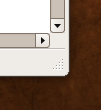
Having used a Mac and linux for the past 15+ years, I can't but help notice the big difference between how the usability for Mac OS X has matured compared to Linux. I have decided to document my thoughts and ideas into this blog so I can revisit them or share them with whom ever wants to listen :-). Before I start, you need to know why I am doing this.  I am a very strong believer in FLOSS and what is stands for but more importantly what it can accomplish.  Currently, Linux is a very viable desktop / laptop OS for the almost-masses.  Technically it seems to be getting better and better.  Almost-gone are the days you need to hunt for your ethernet card to work.  Unfortunately, one area Linux lacks is usability. To inaugurate my new GNOME category, I am starting with a simple usability item that all GNOME applications should have.  I am talking about a window sizer. Here is a screen shot so you know what I am talking about: BTW, this is from FireFox 3. I can't tell you how many t...